Create rooms
Why start here
In Calaos, every device belongs to a room. This is the basic structure of your installation: without a room, you cannot add anything.
This split is not just about tidiness. It determines what your interfaces show: the mobile applications, the touchscreen and the web app present your home room by room. A clear organisation here gives clear interfaces everywhere else.
Creating a room
In the Add menu, choose Room. Then fill in two things:
- the name, as it will appear in every interface;
- the type, which determines the associated icon: living room, kitchen, bedroom, bathroom, outdoors, and so on.
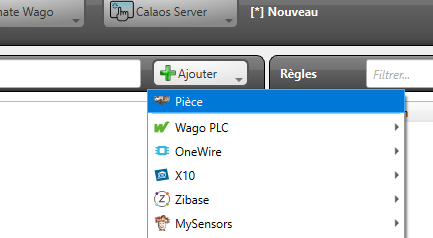
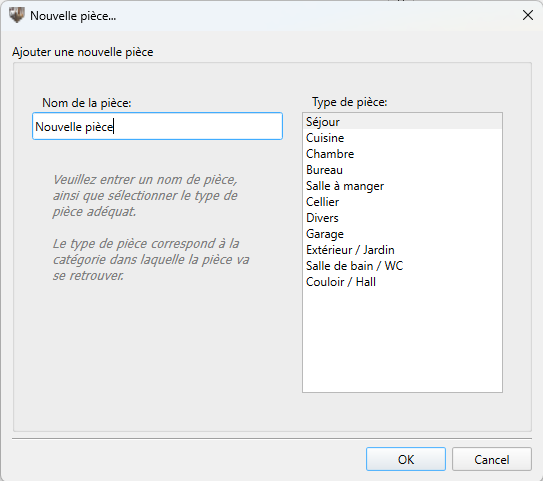
The room then appears in the tree, ready to receive devices — see Create IOs.
Naming your rooms well
The names you choose here will be read every day, on a wall screen or in an application, often by people other than you.
Prefer the name your family actually uses — “Living room”, “Kids’ bedroom” — rather than a reference from an architect’s plan. And stay consistent: if you write “Bedroom 1” and “Parents bedroom”, your lists will look untidy.
Also avoid putting the floor in every name if your house has only one level: it needlessly lengthens the display on small screens.
Which split to adopt
The simplest approach is to follow the real rooms of the house. Two cases deserve some thought:
Open-plan spaces. A living room with a kitchen area can be one room or two. Two separate rooms let you switch the lights off independently, which is often more practical in daily use.
Devices that belong to no room. The gate, the watering system, solar production, the water heater. Create a dedicated room for them — “Outdoors”, “Utility” — rather than attaching them arbitrarily to a neighbouring room.
Changing or deleting
Renaming a room or changing its type can be done at any time; the devices it contains are unaffected.
Deleting a room deletes the devices it contains, and the rules referring to them will stop working. If you want to reorganise, create the new room first and move the devices into it before deleting the old one.
What comes next
Once your rooms are created, you can add your devices to them: Create IOs.