Heating rules
A thermostat or air conditioner contains no policy: no schedule, no away mode. That is the job of rules, which write the device’s setpoint or mode, as they would write any IO. This page gives complete recipes.
The command in a rule action
In a rule, drag the device (not its owned IOs) into the actions area. Calaos Installer shows a form instead of free text: one field per command the device accepts (mode, setpoint, low and high setpoint, fan, swing). Only the fields whose link exists on this device are offered; bounds and value lists come from the device.
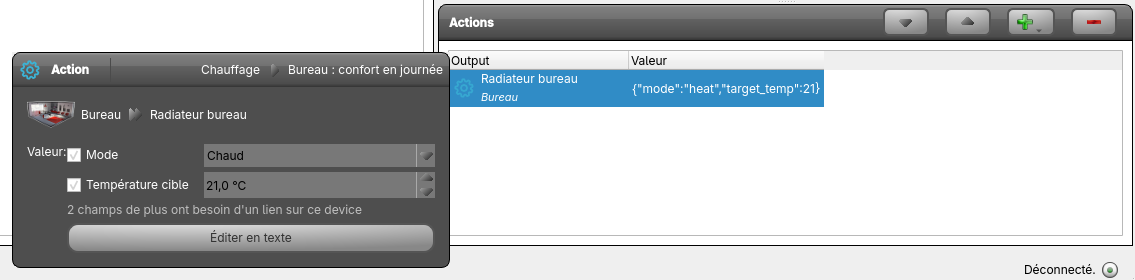 An action on “Radiateur bureau”: Heat mode, 21 °C setpoint.
The stored value is text:
| You want to… | Action value |
|---|---|
| switch off | off |
| heat | heat |
| change only the setpoint | {"target_temp":17} |
| mode and setpoint together | {"mode":"heat","target_temp":21} |
| set a range in auto mode | {"mode":"auto","target_temp_low":20,"target_temp_high":25} |
| fan | {"fan_mode":"low"} |
Only the fields present are applied, and an invalid field is refused and logged without blocking the others. A button switches to text entry if you prefer to write the JSON yourself. The value cannot be “that of another IO”: to copy a value into a setpoint, the rule writes the setpoint IO directly.
Never command a thermostat’s relay in a rule: write its mode (off, heat). The thermostat would put the relay back to the wanted state, and the log would fill with warnings.
1. Schedule the setpoint
The office is heated to 21 °C from 7:30 to 18:00 on weekdays, to 17 °C the rest of the time.
- Create a time range “Bureau occupé” (Monday to Friday, 7:30 to 18:00): see Time programming.
- Rule “Bureau : confort en journée”: condition, the “Bureau occupé” range is true; action, “Radiateur bureau” receives
{"mode":"heat","target_temp":21}. - Rule “Bureau : réduit hors journée”: condition, the range is false; action,
{"target_temp":17}.
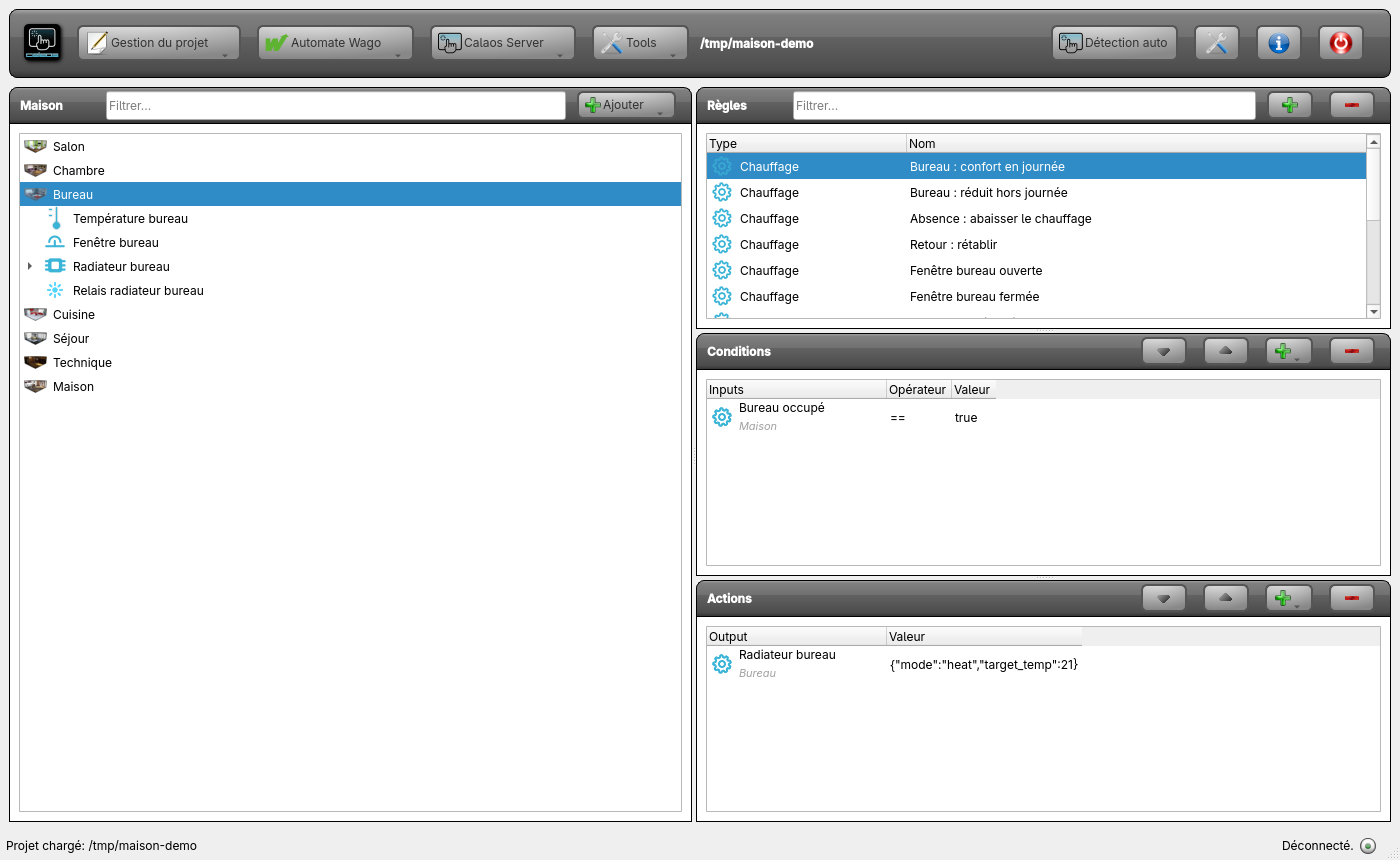 The rule “Bureau : confort en journée”: one condition, one action.
Consider a startup rule (start condition) if you want the setpoint to be right after a server restart.
2. Absence and return
When nobody is home, all heating drops to 16 °C; on return, it goes back up.
- Create a boolean internal variable “Absence”.
- Rule “Absence : abaisser le chauffage”: condition, “Absence” == true; actions:
- Radiateur bureau:
{"mode":"heat","target_temp":16} - PAC cuisine:
{"mode":"auto","target_temp_low":16,"target_temp_high":28} - Plancher séjour:
{"mode":"heat","target_temp":16}
- Radiateur bureau:
- Rule “Retour : rétablir”: condition, “Absence” == false; actions:
{"target_temp":21}on the office and the floor,{"target_temp_low":20,"target_temp_high":25}on the heat pump.
A rule’s actions run in order. To reuse them from a button or a schedule, group them in an “Absence” scenario and put the scenario in the action.
3. Open window
If the office window is open, the radiator stops.
- Rule “Fenêtre bureau ouverte”: condition, “Fenêtre bureau” == true; action, “Radiateur bureau” receives
off. - Rule “Fenêtre bureau fermée”: condition, “Fenêtre bureau” == false; action,
heat.
The setpoint is untouched: on closing, the thermostat resumes where it was.
4. Frost protection
At night, if the living room drops below 10 °C, the air conditioner heats to 17 °C.
Rule “Hors-gel : nuit d’hiver”: conditions, the “Nuit” range is true and “Température salon” < 10; action, “Clim salon” receives {"mode":"heat","target_temp":17}. All conditions of a rule must be true.
For permanent frost protection (house closed for the winter), set the setpoint to 7 °C in heat mode: it is the default lower bound of a thermostat.
5. A common circulator or boiler (floor heating)
The circulator runs as soon as a zone asks for heat (or cold), and stops when no zone asks for anything.
For floor heating alone, each zone is a “Heating thermostat” (emitter “Underfloor heating”) whose output is its valve. Each thermostat has its own output (a valve or relay per zone; an output can belong to one thermostat only). Rather than guessing what the thermostat is doing, the rules read those outputs themselves: they are exactly the relays the regulation drives.
- One rule per zone output, for example “Circulateur : Relais radiateur bureau allumé”: condition, the output “Relais radiateur bureau” ==
true; action, “Circulateur chauffage” on. Do the same for every heating and cooling output of the other zones (“PAC cuisine chaud”, “PAC cuisine froid”, “Plancher chaud”, “Plancher froid”). - One rule “Circulateur : toutes les zones éteintes”: one condition per zone output, all ==
false; action, “Circulateur chauffage” off.
The conditions are of the Condition on output event kind (the + menu of the conditions, after selecting the output in the tree): it is the kind that can read the state of a relay. The “Normal Condition” kind only applies to inputs.
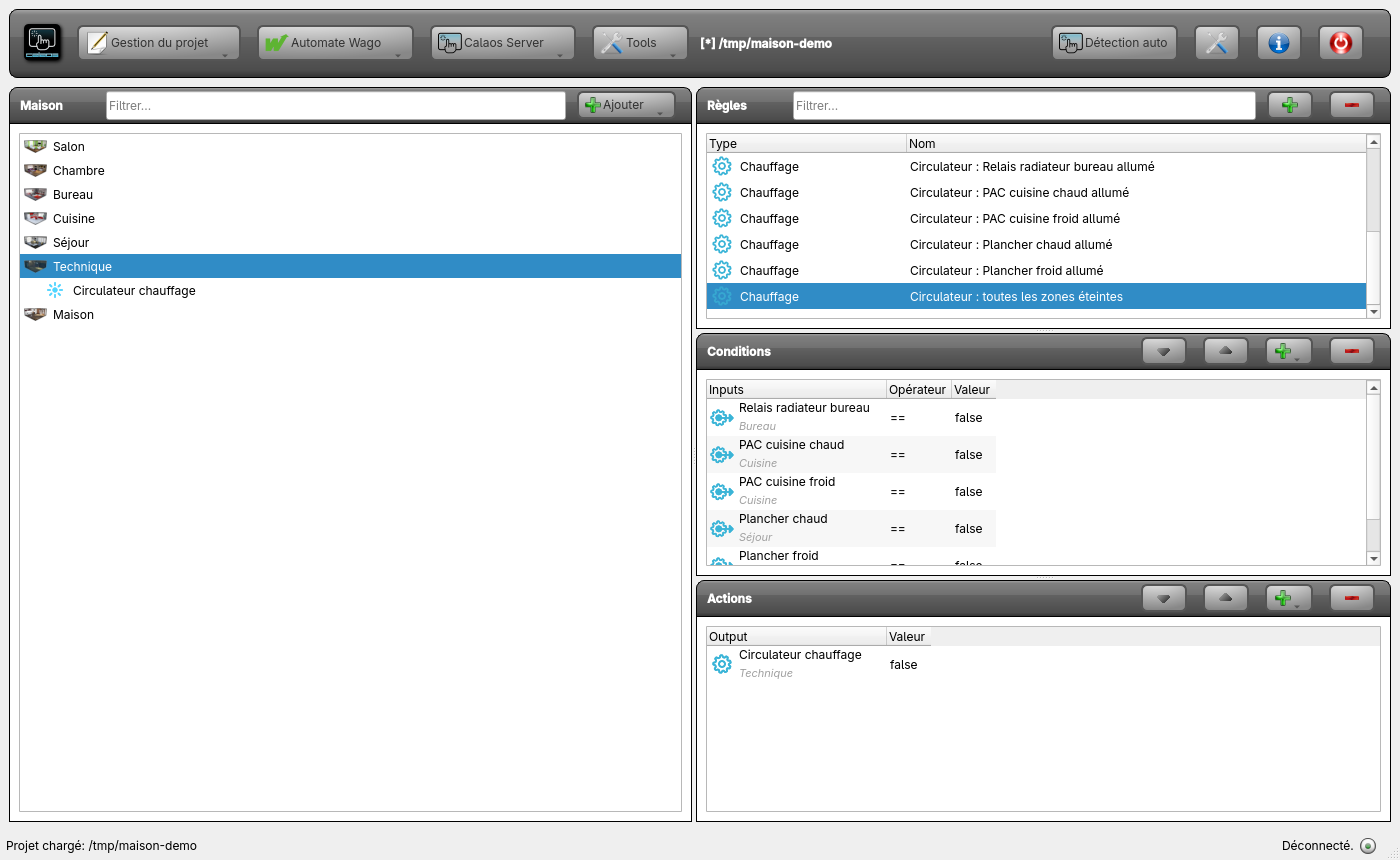 The “all zones off” rule: one condition per output (the fifth, “Plancher froid”, is below the visible list) and the circulator switched off.
Why it works in every mode
An output is on if and only if the thermostat is asking for heat or cold at that moment. The mode (heat, cool, auto), the setpoint, the minimum on and off times, the safeties (silent sensor, out-of-range sensor, dew point) and the thermostat’s lockouts all decide the state of the output, and the rule only sees the result. It does not need to know the mode: a thermostat in cool or auto, or cut by a safety, behaves correctly with no extra rule. By contrast, a rule written on the thermostat’s “action” IO (heating) ignores cooling and runs ahead of the relay whenever a minimum time delays the switching.
These rules never write the outputs, they only read them: the circulator is the only output they drive.
6. Reversible floor: nine zones and a heat pump
A house with nine zones of hydronic floor. A heat pump makes hot or cold water according to two dry contacts, “heat demand” and “cool demand”, which must never be on together. Each zone has a single valve, the same for heating and cooling. Six zones can cool; the bathroom, the entrance and the laundry room only heat.
Calaos has no “heat pump” device: the zone thermostats drive their valves, and rules derive the demand to the pump from them. The whole thing is four pieces:
- one thermostat per zone, with the Reversible floor zone template;
- a “Mode plancher” variable (0 off, 1 heat, 2 cool) that gives the mode to every zone;
- rules that turn the right heat pump contact on according to the open valves and the mode;
- rules that put back into the house mode a zone set by hand to the other direction.
Step 1: the nine zones
For each zone, add a device with the Reversible floor zone template (see Create a device): the zone sensor, its valve (one relay per zone: an output has one thermostat only) and the modes. The six zones that cool keep Heating and Cooling; the other three only keep Heating, so the modes parameter is off,heat.
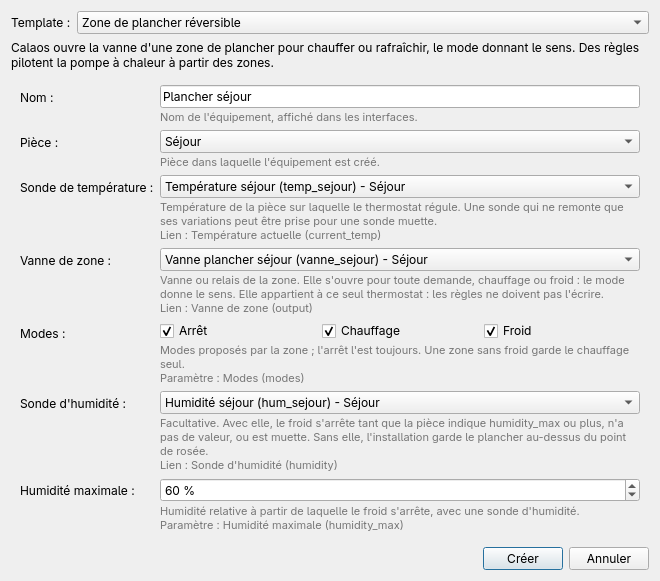 “Plancher séjour”: heating and cooling, with a humidity sensor.
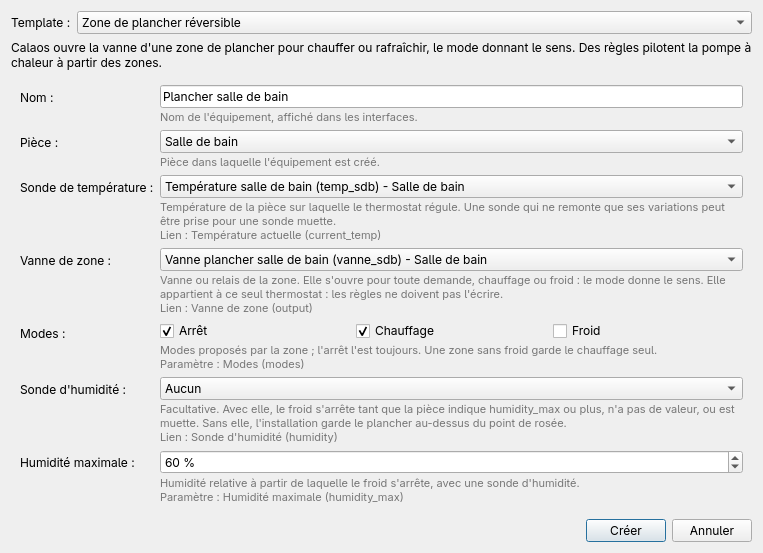 “Plancher salle de bain”: heating only.
Also create the two heat pump relays, “PAC demande chaud” and “PAC demande froid”: they are plain outputs, owned by no thermostat, that only the rules below drive.
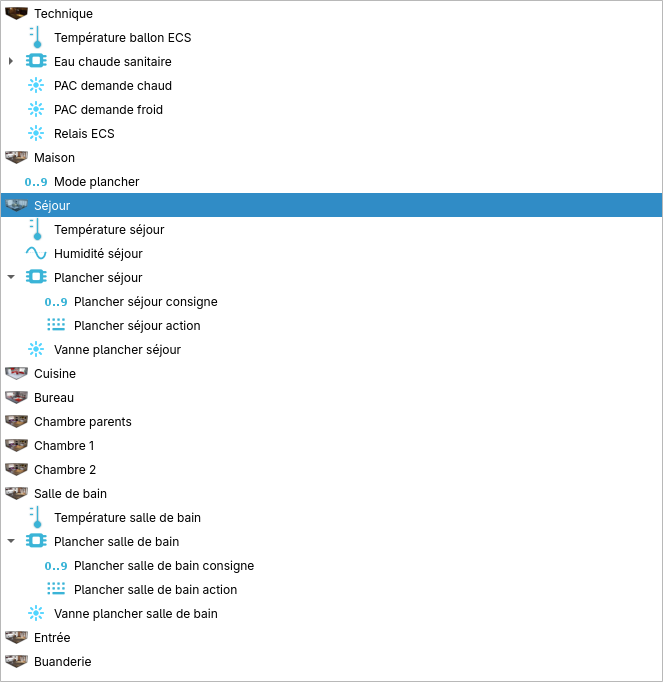 Nine zones, their valves, the two pump contacts and the “Mode plancher” variable.
Step 2: the house mode
Create an internal variable of integer type, “Mode plancher”, initial value 0, with Save ticked so that it survives a restart. Its values:
| Value | House mode |
|---|---|
| 0 | off |
| 1 | heat |
| 2 | cool |
It is changed like any IO: from a scenario, from a rule (according to the outdoor temperature or the calendar), or by hand if you make it visible in the interfaces. Three rules pass it on to the zones:
| Rule | Condition | Actions |
|---|---|---|
| Plancher : arrêt général | “Mode plancher” == 0 | every zone receives off |
| Plancher : mode chaud | “Mode plancher” == 1 | every zone receives heat |
| Plancher : mode froid | “Mode plancher” == 2 | the six zones that cool receive cool, the other three off |
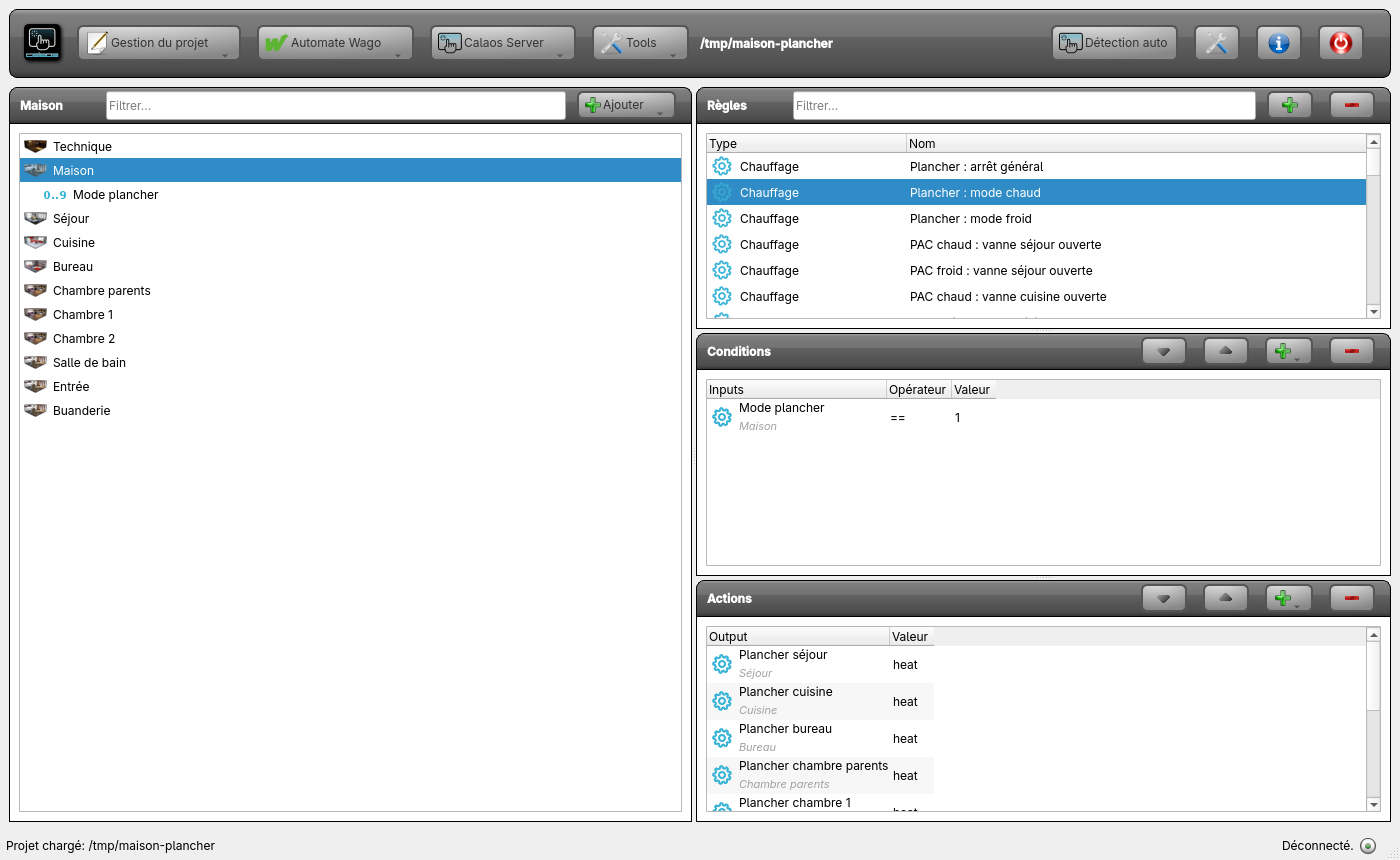 The “heat mode” rule: one condition on the variable, nine actions.
A zone without cooling refuses cool (it does not have that mode): in cool mode it receives off and switches off.
Step 3: the heat pump contacts
A valve is on if and only if its thermostat asks for heat or cold: as for the circulator, the rules read the valves. The valve does not say in which direction, the house mode does.
| Rule | Conditions | Actions, in this order |
|---|---|---|
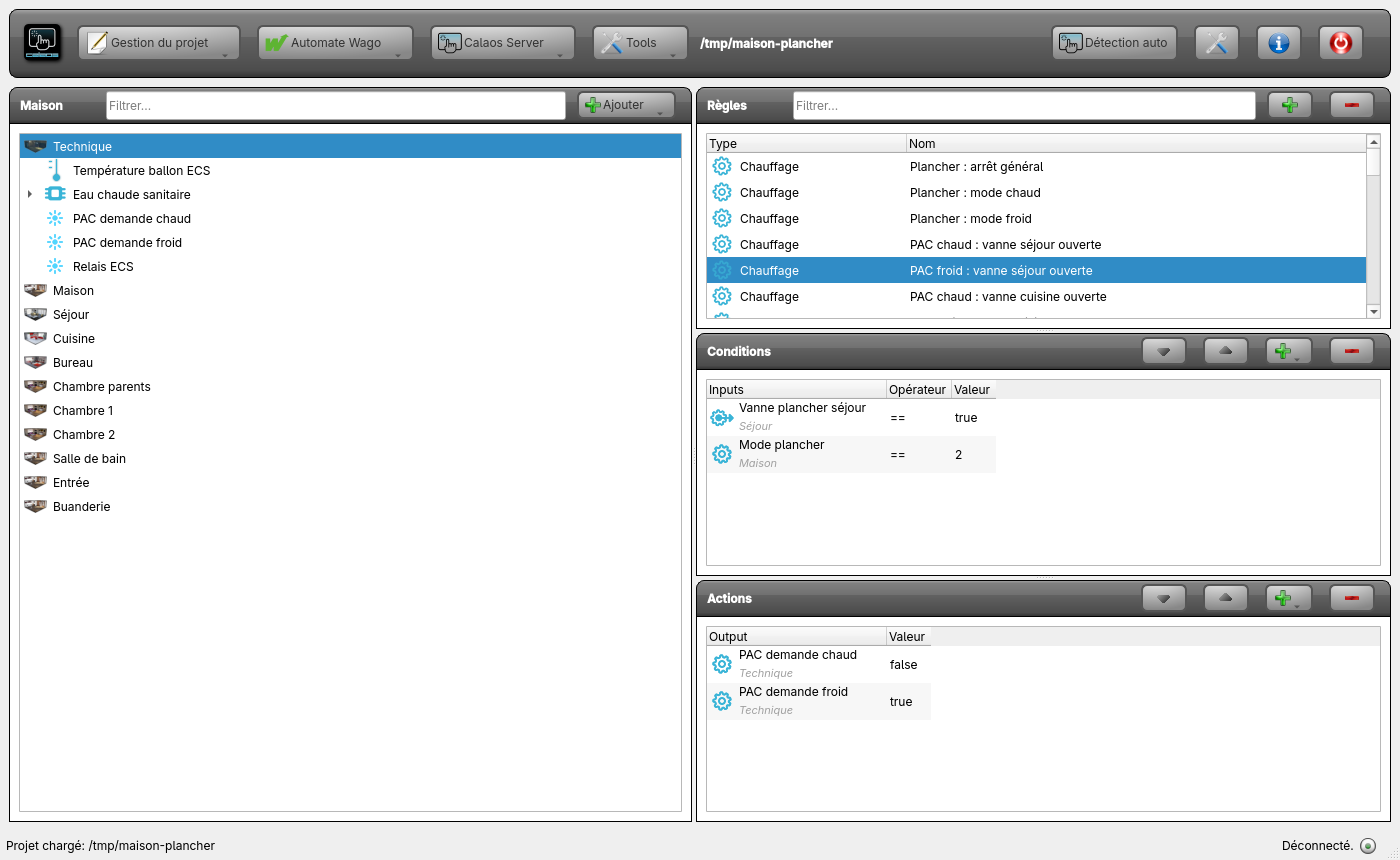
| PAC chaud : vanne zone ouverte (nine rules) | valve zone == true and “Mode plancher” == 1 | “PAC demande froid” off, then “PAC demande chaud” on |
| PAC froid : vanne zone ouverte (six rules, the zones that cool) | valve zone == true and “Mode plancher” == 2 | “PAC demande chaud” off, then “PAC demande froid” on |
| PAC : toutes les vannes fermées | the nine valves == false | “PAC demande chaud” and “PAC demande froid” off |
Each rule first switches the opposite contact off, then its own on: the two contacts are never on together. The conditions on the valves are of the Condition on output event kind (as for the circulator) and the one on the variable a Normal condition.
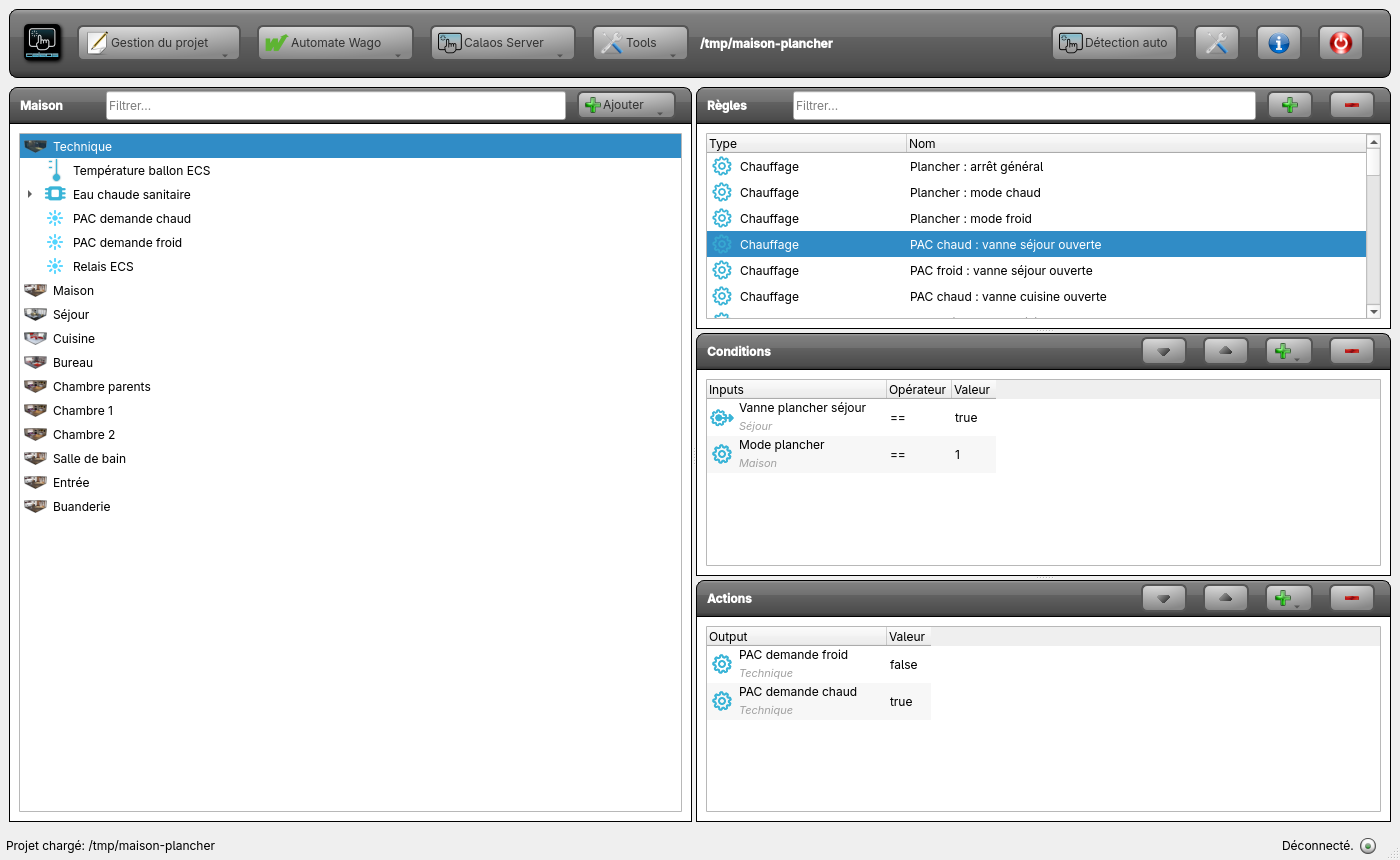 A valve opens in heat mode: the “cool” contact is switched off, the “heat” contact on.
 The same zone in cool mode.
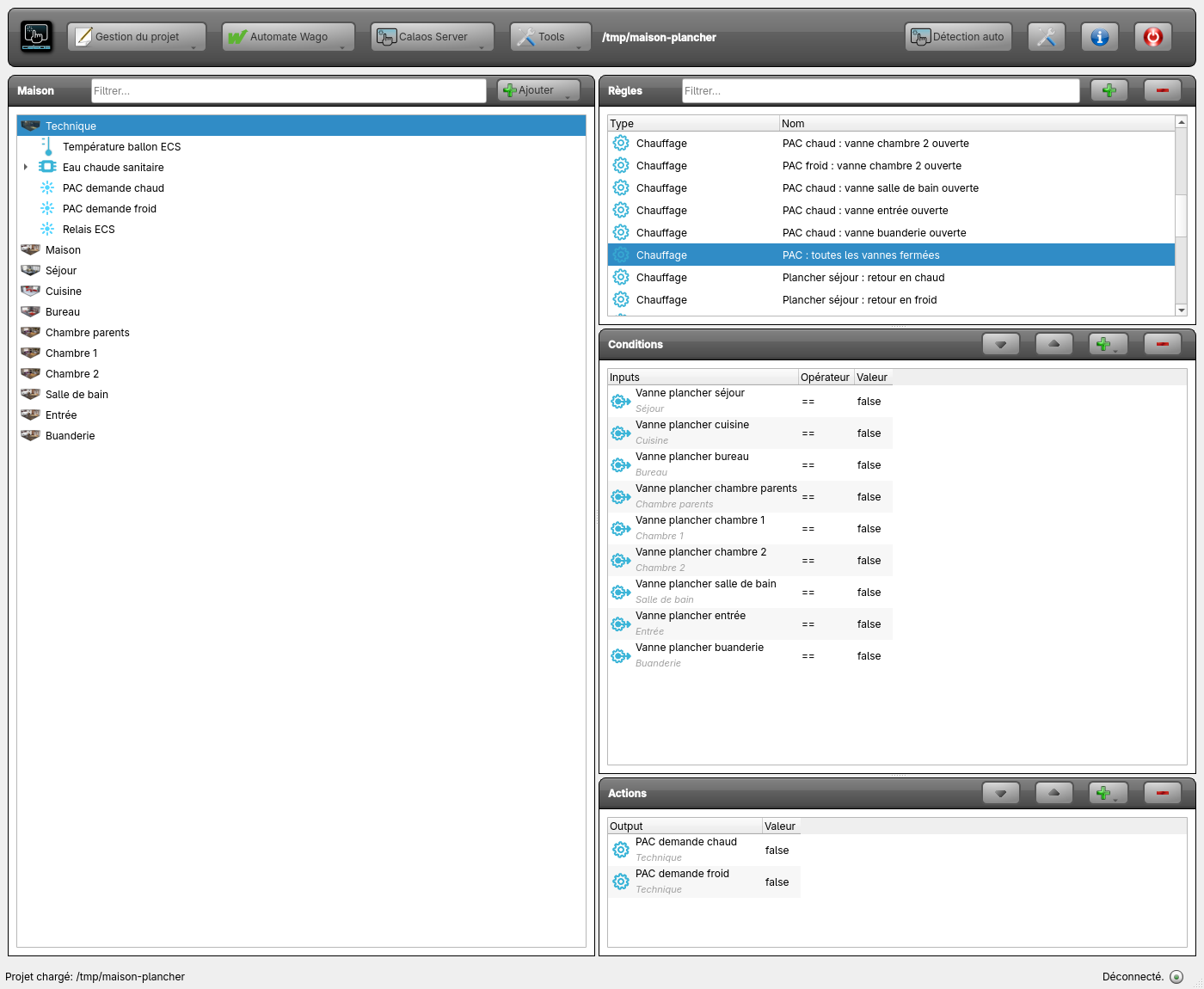 The nine valves closed: the pump has no demand any more.
When the house mode changes, the valves open in the old direction close after min_on_time (15 minutes), then reopen in the new direction after min_off_time: the “all valves closed” rule switches the contacts off when the last one closes, and the contact of the new direction comes on at the first reopening.
Step 4: a zone set by hand to the other direction
Someone puts a zone in cool during the heating season: its valve would open, the pump would supply hot water, and the zone would warm up while asking to cool. One rule per zone and per direction puts the zone back into the house mode as soon as its mode changes:
| Rule | Conditions | Action |
|---|---|---|
| Plancher zone : retour en chaud (six zones) | zone == cool and “Mode plancher” == 1 | zone receives heat |
| Plancher zone : retour en froid (nine zones) | zone == heat and “Mode plancher” == 2 | zone receives cool (off for a zone without cooling) |
The condition on zone is a Condition on output event on the device itself (select the device in the tree, not one of its IOs): the compared value is its mode. Switching a zone off by hand (off) is not opposed.
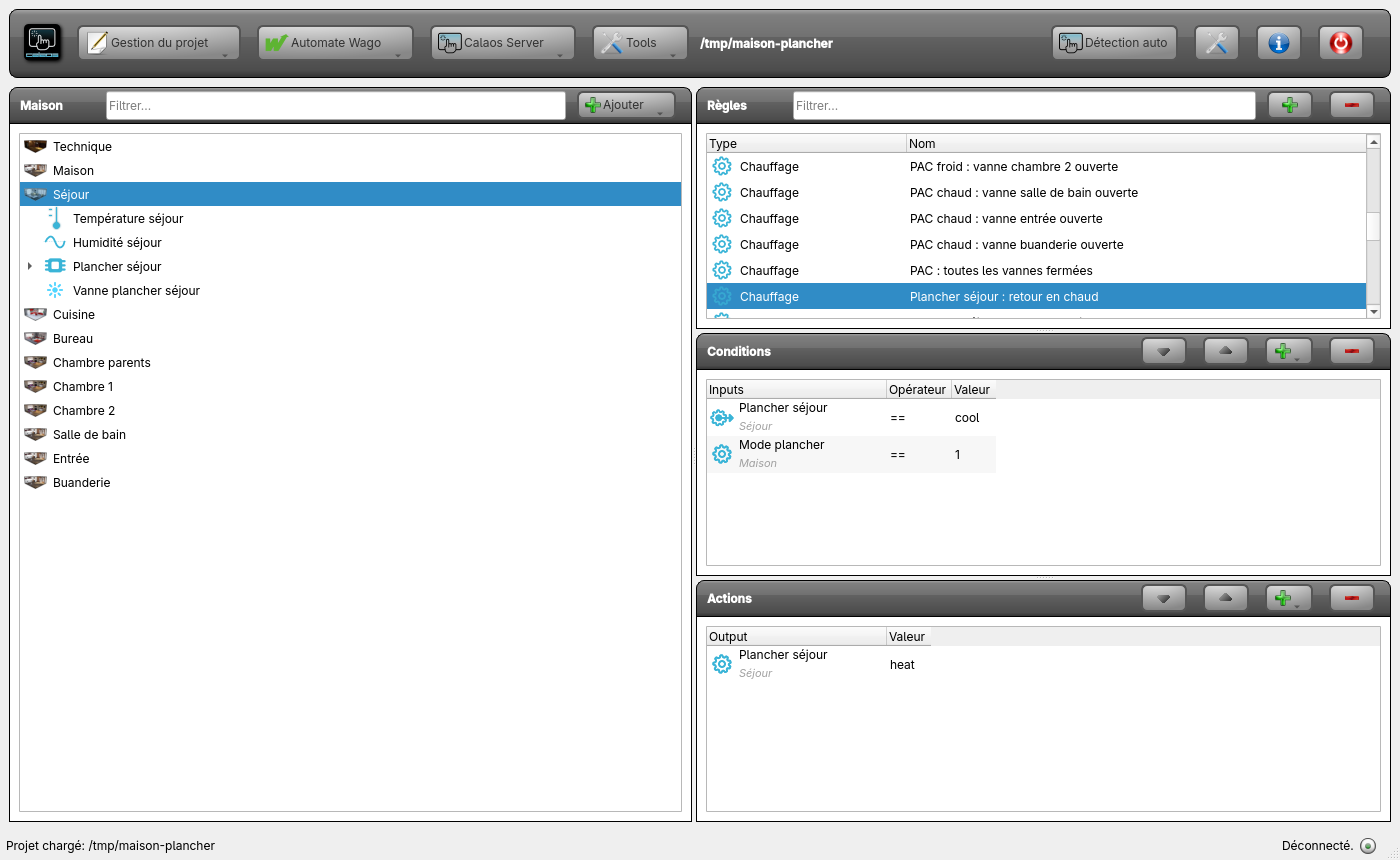 A living room zone set to cool during the heating season goes back to heat.
The dew point
This installation has no humidity sensor in every zone: the heat pump keeps the cold water above the dew point. The zone thermostat therefore does not cut cooling by itself; the server notes it, for each zone without a sensor, with a warning at load (“cooling has no dew-point cut”): this is expected when the heat pump handles condensation. A zone with a humidity sensor (the living room, above) cuts its cooling as soon as humidity reaches humidity_max: its valve closes and the pump contacts follow the valve, with no extra rule. See Internal thermostat.
7. Domestic hot water on the same heat pump
The domestic hot water tank is heated by the same heat pump, but it depends neither on the zones nor on the house mode.
Hot water is an independent thermostat, with its own sensor and its own relay, that has no link with the nine zones and that none of the rules above reads. It is the hot water demand of the heat pump, which the thermostat switches by itself.
Create the tank sensor and the hot water demand relay, then a Heating thermostat. The emitter has no equivalent for a tank: choose “Water radiators” (300 s minimum on and off times), then adapt.
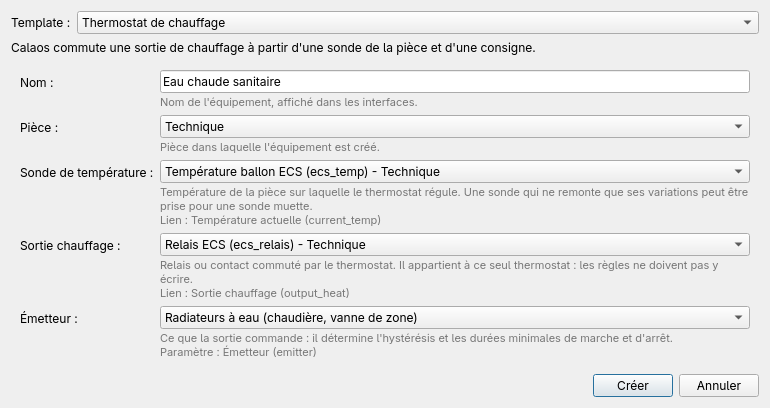 “Eau chaude sanitaire”: the tank sensor and the demand relay.
In the device editor, change what the templates set for a room:
Parameter Template For a tank Why valid_max60 95 at 60 °C a properly hot tank sensor would be judged “out of range” and cut production valid_min-30 5 an unplugged or shorted sensor leaves these bounds hysteresis0.5 3 a tank has inertia: avoid short restarts 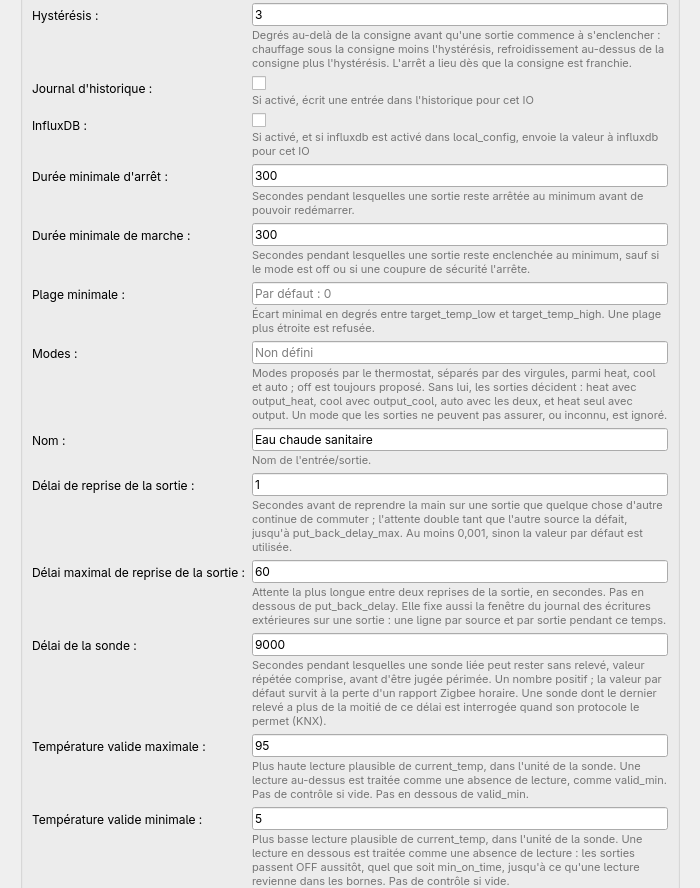 The parameters of “Eau chaude sanitaire”.
Raise the maximum setpoint: a thermostat’s setpoint is an internal variable limited to 30 °C by default. Open its properties in the tree and set
value_maxto 65 (and the value to 55, for instance): a 55 °C setpoint would otherwise be brought back to 30 °C.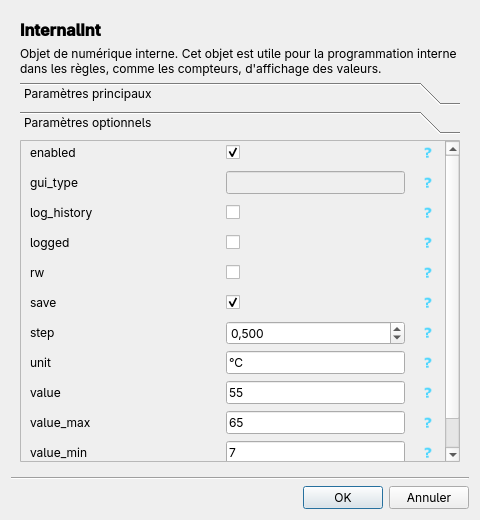 The hot water setpoint: bounds raised.
The demand relay belongs to the thermostat: only write its mode in rules (for instance off to allow hot water only at certain hours, as in recipe 1). It has nothing to do with “PAC demande chaud” and “PAC demande froid”, which only the zones drive.
Pitfalls
- Loops: a rule that writes a setpoint and has that same setpoint in its conditions can call itself indefinitely. Use an internal variable to remember that the action has been done.
- Contradicting rules: a schedule and an absence rule write the same setpoint; the last one executed wins. Add the condition “Absence == false” to the schedule rules.
- After a server restart, nothing guarantees that the setpoint matches the time: add a rule with a start condition that restores it.
- A heat pump contact is only driven by rules: no thermostat owns it, and the “all valves closed” rule must exist, otherwise a contact stays on after the last demand.