ESPHome air conditioner
This guide describes an air conditioner that regulates by itself and that Calaos drives over MQTT: an ESP32 module wired to the service port of the indoor unit, running ESPHome. The example uses a Mitsubishi split connected through its CN105 connector; the approach is the same for a Fujitsu.
Indoor unit ──(serial)── ESP32 / ESPHome ──(MQTT)── Mosquitto broker ── Calaos
                                                              ▲
                              room temperature ───────────────┘ (relayed by Calaos)
Calaos does not regulate: the unit keeps its own modulation. Calaos reads its state, sends the mode, setpoints, fan and swing, and can relay the temperature of a room sensor to it, which is more accurate than the unit’s own sensor mounted high on the wall.
The esphome_climate template of the wizard creates all the needed MQTT IOs in one go. It asks for the module’s topic prefix and entity id: the wizard can find them itself on the MQTT broker, or you read them by hand.
The ESPHome module: Mitsubishi CN105 example
The component used is MitsubishiCN105ESPHome. Here is the YAML of a module, without its secrets:
esphome:
  name: clim-salon

esp32:
  board: esp32dev
  framework:
    type: esp-idf

# INFO: at DEBUG level the CN105 component is very chatty.
logger:
  level: INFO

wifi:
  ssid: !secret wifi_ssid
  password: !secret wifi_password
  reboot_timeout: 2min

ota:
  - platform: esphome
    password: !secret ota_password

mqtt:
  broker: !secret mqtt_broker
  port: !secret mqtt_port
  username: !secret mqtt_username
  password: !secret mqtt_password
  discovery: false          # Calaos does not use Home Assistant discovery
  topic_prefix: "clim_salon"
  log_topic: null           # do not publish the module logs on the broker
  id: mqtt_client

external_components:
  - source: github://echavet/MitsubishiCN105ESPHome

uart:
  - id: uart_clim
    tx_pin: GPIO32
    rx_pin: GPIO33
    baud_rate: 2400
    rx_full_threshold: 120

sensor:
  # Room temperature, published by Calaos (see "Relayed room temperature").
  - platform: mqtt_subscribe
    id: calaos_room_temp
    topic: clim_salon/calaos/remote_temp
    internal: true

climate:
  - platform: cn105
    id: clim_salon_hp
    name: Clim salon
    uart_id: uart_clim
    remote_temperature_source:
      sensor_id: calaos_room_temp
    remote_temperature_timeout: 15min
    update_interval: 3500ms
    debounce_delay: 100ms
    supports:
      dual_setpoint: true
      mode: [HEAT_COOL, COOL, HEAT, DRY, FAN_ONLY]
      fan_mode: [AUTO, QUIET, LOW, MEDIUM, HIGH]
      swing_mode: ["OFF", VERTICAL, HORIZONTAL, BOTH]
    visual:
      min_temperature: 17
      max_temperature: 28
      temperature_step:
        target_temperature: 0.5
        current_temperature: 0.1
The component’s diagnostic sensors (compressor frequency, power, energy, outdoor temperature, Wi-Fi signal…) are optional and not used by Calaos; add the ones you like.
The lines that matter to Calaos
| Line | Why |
|---|---|
mqtt: with discovery: false and a topic_prefix | ESPHome publishes under <prefix>/climate/<id>/...; the wizard asks for this prefix. |
logger: level: INFO and log_topic: null | At DEBUG level the component publishes its logs over MQTT continuously: the broker is flooded and the module slows down. Keep INFO, and stop publishing logs on the broker. |
supports: dual_setpoint: true | The climate publishes a low and a high setpoint instead of a single one. Required for the HEAT_COOL mode. |
mode: [HEAT_COOL, ...] | HEAT_COOL (heat or cool automatically between two setpoints) matches Calaos’s auto mode. |
remote_temperature_source and the mqtt_subscribe sensor | This is what lets Calaos provide the room temperature. |
remote_temperature_timeout | After this delay without a new value the component falls back to the unit’s sensor. It must be longer than Calaos’s keep-alive interval (120 s by default). |
Relayed room temperature
The mqtt_subscribe sensor reads the <prefix>/calaos/remote_temp topic. In Calaos, the device writes on this topic the value of the room sensor you chose in the wizard (“Room sensor” field), on every change and every remote_temp_keepalive seconds (120 s by default). The periodic repeat is mandatory: with no new value for remote_temperature_timeout, the unit goes back to its internal sensor.
Calaos stops relaying a sensor that has been silent for sensor_timeout seconds (9000 s by default) or that reports itself disconnected: the unit then falls back to its own sensor by itself, instead of regulating on a stale value.
Only modules that accept a remote temperature (here the serial CN105) benefit from it. An infrared air conditioner (climate_ir) cannot receive one: see the esphome_climate_ir template in Create a device.
Fujitsu example
The esphome-fujitsu-halcyon component drives Fujitsu AirStage-H (Halcyon) units over their serial bus:
esphome:
  name: clim-fuji

esp32:
  board: esp32dev
  framework:
    type: arduino

logger:
  level: INFO

mqtt:
  broker: !secret mqtt_broker
  port: !secret mqtt_port
  username: !secret mqtt_username
  password: !secret mqtt_password
  discovery: false
  topic_prefix: "clim_fuji"
  log_topic: null

external_components:
  - source: github://Omniflux/esphome-fujitsu-halcyon

uart:
  - id: uart_clim
    tx_pin: GPIO17
    rx_pin: GPIO16
    baud_rate: 500
    parity: EVEN
    rx_full_threshold: 120

climate:
  - platform: fujitsu-halcyon
    id: clim_fuji_hp
    name: Clim Fuji
    uart_id: uart_clim
    controller_address: 1      # 0 = primary, 1 = secondary
This component publishes a single setpoint: in the wizard, leave “Two setpoints” unchecked. Its AUTO mode is sent as auto: set the device’s auto_payload parameter to auto (by default Calaos writes heat_cool). Remote temperature depends on what the component accepts (it has a temperature_sensor_id option to use an ESPHome sensor): check its documentation, then feed that sensor with an mqtt_subscribe as above.
Finding it on the MQTT broker
For both ESPHome templates, the Calaos Installer wizard shows above the form a panel “Le trouver sur le broker MQTT” (find it on the MQTT broker): it queries the broker and offers the climates it sees, instead of making you guess the prefix and the id.
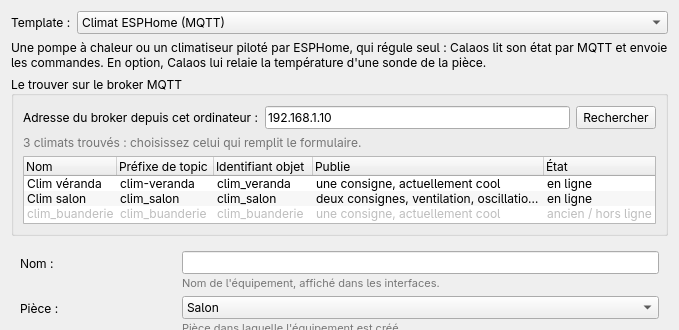 Three climates found: two online, one greyed-out old node.
- Check the broker address, as your computer reaches it (not
127.0.0.1, which designates the computer itself). The wizard proposes the one most MQTT IOs of the project use, otherwise the box’s. The project’s MQTT credentials are only sent to that broker. - Click Rechercher (Search), or press Enter. The installer listens to the broker for three seconds.
- The list gives, for each climate, its name, its topic prefix, its entity id, what it publishes (one or two setpoints, fan, swing, action) and its state.
- Click a row: the form is filled in.
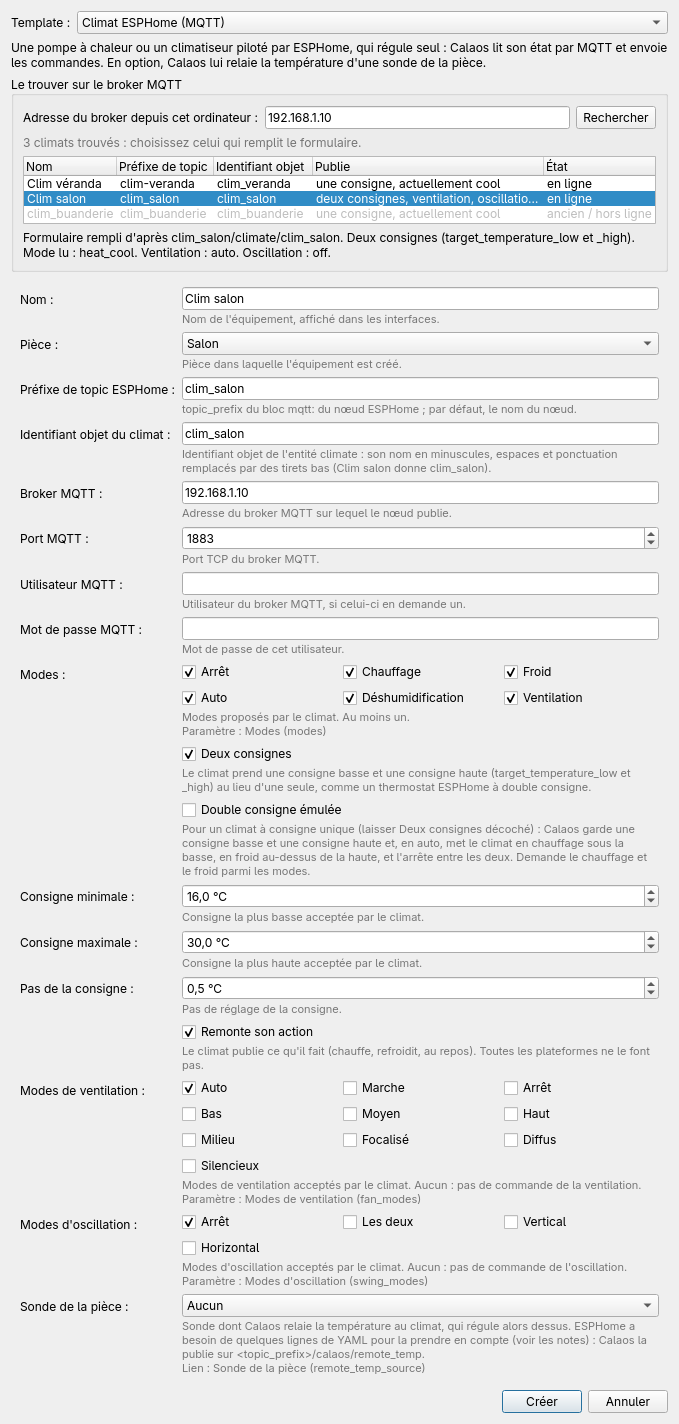 The “clim_salon” climate chosen: prefix, id, two setpoints, action, fan and swing are filled in.
What choosing fills in: the prefix, the id, the name (if empty), “Two setpoints” or not, fan, swing, action reporting and the sensor, from the published topics. If the module publishes its Home Assistant discovery configuration (discovery: true in its mqtt: block), the modes and the setpoint range are read too: heat_cool becomes auto, ESPHome’s own auto mode (a schedule of the unit) and custom modes are dropped and reported under the list. The form stays editable.
The rows greyed out as “ancien / hors ligne” (old / offline) are at the bottom of the list: they are states the broker retained for a former id or a vanished node. Do not choose them: a device created on them would stay silent.
Errors are said on screen: host not found, connection refused, credentials refused, timeout. The panel only exists in an installer built with Qt MQTT; without it, the manual entry below remains valid.
Finding the prefix and the entity id by hand
The wizard asks for two values, which can be read in the module’s MQTT topics:
<prefix>/climate/<id>/mode/state
- the prefix is the
topic_prefixof the module’smqtt:block (by default, the module name); - the id is the name of the climate entity (
name:) in lower case, with spaces and punctuation replaced by underscores. “Clim salon” givesclim_salon, “Clim Mitsu Buanderie” givesclim_mitsu_buanderie.
Do not confuse the entity id with the module name: for a module clim-mitsu whose entity is called “Clim Mitsu Buanderie”, the prefix is clim_mitsu and the id clim_mitsu_buanderie. A wrong id produces no error: the device simply stays silent.
The safest is to listen to what the module publishes. From a computer that has mosquitto-clients (or with a graphical tool such as MQTTX, see MQTT):
mosquitto_sub -h 192.168.1.10 -p 1883 -u user -P password -v -t 'clim_salon/#'
After a minute or two you see:
clim_salon/status online
clim_salon/climate/clim_salon/mode/state heat_cool
clim_salon/climate/clim_salon/current_temperature/state 19.2
clim_salon/climate/clim_salon/target_temperature_low/state 19.5
clim_salon/climate/clim_salon/target_temperature_high/state 24.5
clim_salon/climate/clim_salon/action/state heating
clim_salon/climate/clim_salon/fan_mode/state auto
clim_salon/climate/clim_salon/swing_mode/state off
To list only the climates of a broker: mosquitto_sub -h ... -v -t '+/climate/#' -W 60.
One or two setpoints
It depends on the module, not on the air conditioner, and can be read in the topics:
| Topics published | In the wizard |
|---|---|
.../target_temperature/state | “Two setpoints” unchecked |
.../target_temperature_low/state and .../target_temperature_high/state | “Two setpoints” checked |
With dual_setpoint: true in the YAML, the module publishes the low and the high setpoint and not the single one. Checking the wrong box shows no error: the device never receives the setpoint it expects and stays “Unknown”. The search on the broker picks the right box from what the module publishes. A single-setpoint unit can still offer a range in Calaos: see the emulated dual setpoint below.
Fan speeds and swing
Calaos translates nothing: it sends and receives ESPHome’s strings, in lower case. The list checked in the wizard must match supports: fan_mode: of the YAML:
| ESPHome YAML | In the wizard |
|---|---|
AUTO, QUIET, LOW, MEDIUM, HIGH, MIDDLE | Auto, Quiet, Low, Medium, High, Middle |
swing_mode: ["OFF", VERTICAL, HORIZONTAL, BOTH] | Off, Vertical, Horizontal, Both |
A mode checked in Calaos but missing from the YAML is refused by the module; a mode in the YAML that is not checked is simply not offered. To check a value, watch the fan_mode/state topic while you change the fan on the remote control.
The matching device in io.xml
The esphome_climate template writes, for the Mitsubishi module above with one setpoint (excerpt; the connection attributes host, port, data and connected_status_* are repeated on every IO and omitted here):
<calaos:device id="salon_ac" type="climate" impl="proxy" name="Clim salon" visible="true">
  <calaos:output id="salon_ac_mode" type="MqttOutputString" visible="false"
      topic_pub="clim_salon/climate/clim_salon/mode/command"
      topic_sub="clim_salon/climate/clim_salon/mode/state" />
  <calaos:input id="salon_ac_current_temp" type="MqttInputTemp" visible="false"
      topic_sub="clim_salon/climate/clim_salon/current_temperature/state" />
  <calaos:output id="salon_ac_target_temp" type="MqttOutputAnalog" visible="false"
      topic_pub="clim_salon/climate/clim_salon/target_temperature/command"
      topic_sub="clim_salon/climate/clim_salon/target_temperature/state"
      value_min="17" value_max="28" step="0.5" unit="°C" />
  <calaos:input id="salon_ac_action" type="MqttInputString" visible="false"
      topic_sub="clim_salon/climate/clim_salon/action/state" />
  <calaos:output id="salon_ac_fan_mode" type="MqttOutputString" visible="false"
      topic_pub="clim_salon/climate/clim_salon/fan_mode/command"
      topic_sub="clim_salon/climate/clim_salon/fan_mode/state" />
  <calaos:output id="salon_ac_remote_temp" type="MqttOutputAnalog" visible="false"
      topic_pub="clim_salon/calaos/remote_temp"
      topic_sub="clim_salon/calaos/remote_temp" />

  <calaos:link name="mode" io="salon_ac_mode" />
  <calaos:link name="current_temp" io="salon_ac_current_temp" />
  <calaos:link name="target_temp" io="salon_ac_target_temp" />
  <calaos:link name="action" io="salon_ac_action" />
  <calaos:link name="fan_mode" io="salon_ac_fan_mode" />
  <calaos:link name="remote_temp" io="salon_ac_remote_temp" />
  <calaos:link name="remote_temp_source" io="salon_temp" />   <!-- room sensor, external IO -->

  <calaos:param name="modes" value="off,heat,cool,auto,dry,fan_only" />
  <calaos:param name="auto_payload" value="heat_cool" />
  <calaos:param name="fan_modes" value="auto,quiet,low,medium,high" />
  <calaos:param name="remote_temp_keepalive" value="120" />
  <calaos:param name="sensor_timeout" value="9000" />
</calaos:device>
With two setpoints (dual_setpoint: true), the single setpoint is replaced by two IOs and two links:
  <calaos:output id="salon_ac_target_temp_low" type="MqttOutputAnalog" visible="false"
      topic_pub="clim_salon/climate/clim_salon/target_temperature_low/command"
      topic_sub="clim_salon/climate/clim_salon/target_temperature_low/state"
      value_min="17" value_max="28" step="0.5" unit="°C" />
  <calaos:output id="salon_ac_target_temp_high" type="MqttOutputAnalog" visible="false"
      topic_pub="clim_salon/climate/clim_salon/target_temperature_high/command"
      topic_sub="clim_salon/climate/clim_salon/target_temperature_high/state"
      value_min="17" value_max="28" step="0.5" unit="°C" />

  <calaos:link name="target_temp_low" io="salon_ac_target_temp_low" />
  <calaos:link name="target_temp_high" io="salon_ac_target_temp_high" />
The interfaces then show two handles in auto mode, at least min_range apart.
Emulated dual setpoint
Many air conditioners have one setpoint and no auto mode between two setpoints. The “Emulated dual setpoint” option of the wizard (emulate_range parameter, off by default) gives Calaos the missing role: the device owns a low and a high setpoint, stored by Calaos (internal variables created at load, at 19 and 25 °C to start with, kept across restarts), and the interfaces show the range and the auto mode as for a two-setpoint unit.
The option is meant for a single-setpoint unit: do not tick it with “Two setpoints”. The device also needs a writable setpoint and the heat and cool modes; otherwise it is refused at load, with a message in the log, and auto drives nothing.
In auto mode, Calaos drives the unit in simple mode:
| Room temperature | What Calaos makes the unit do |
|---|---|
below low - hysteresis | switches to heat, with the low setpoint |
above high + hysteresis | switches to cool, with the high setpoint |
low setpoint reached in heat, high setpoint reached in cool | switches to off: nothing runs between the two setpoints |
The unit’s setpoint is written before the mode, so that it does not start on the old setpoint. A changeover from heat to cool always goes through off. During auto the single setpoint cannot be set: it is driven by the other two. Calaos never sends auto to the unit.
Protecting the compressor
The template writes these values, which can be changed in the device editor:
| Parameter | Value | Role |
|---|---|---|
hysteresis | 0.5 °C | gap beyond the range before the unit starts |
min_on_time | 300 s | minimum run time before auto stops the unit |
min_off_time | 300 s | minimum stop time before auto restarts it |
changeover_delay | 600 s | delay between the end of heat and the start of cool (or the reverse), at least min_off_time |
min_range | 2 °C | minimum gap between the low and the high setpoint |
A mode chosen by the user (heat, cool, off) applies at once, without waiting for these times. A postponed start is announced as “Starts in N min” in the interfaces.
After a server restart, Calaos picks up where it was: a stop waits min_on_time, a start waits min_off_time, and the changeover delay only applies towards the mode opposite to the last heat or cool of the unit. The auto mode itself is kept.
When auto changes nothing
- The sensor does not answer: the reference is the room sensor relayed to the unit if you chose one, otherwise the temperature the unit measures. While it has not read anything, has been silent for
sensor_timeout, is disconnected, or does not give a number, Calaos leaves the unit as it is and the interface shows the fault (“Waiting for the sensor”, “Sensor silent”…). The unit is not stopped for that. - The unit is unreachable (offline): nothing is sent.
- Someone changes the mode on the remote control:
autois suspended (a message is logged) and Calaos does not take back a choice made on site; it resumes when you selectautoagain. The previous mode, which ESPHome sometimes republishes during the 10 seconds (readback_hold) after a command, is not mistaken for a manual change. - The unit rounds or imposes a minimum: if the setpoint it reads back differs by more than half a step from the one sent, Calaos writes it again, at most once every 10 seconds. If it still differs afterwards (rounding, a minimum specific to its mode), Calaos leaves it as it is, logs it once, and does not write again until the next setpoint it decides itself.
And if it does not work
The Troubleshooting page explains the usual symptoms: “Unknown” state, “Offline”, invisible device.